Download Popular Antivirus Program

Showing posts with label a fake antivirus program. Show all posts

Friday, October 25, 2013

How to Remove Antivirus Security Pro Manually?


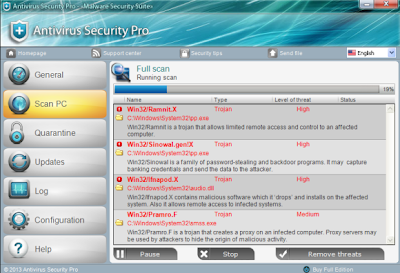
Antivirus Security Pro is a fake antivirus program that was produced by cybercriminals with the only goal to extort money from unsuspecting computer users. When installed on the corrupted PC, it urges victimized computer users to register for an imaginary licensed version to remove supposed malware threats from the computer it allegedly finds. It uses deceptive methods to intimidate affected PC users into thinking their computers have been corrupted by various malware infections. Usually, this fake application spreads via the Internet on bogus online security websites by using Trojans. It is installed on the targeted computer without the PC user’s consent and awareness.

Antivirus Security Pro will access the vulnerable computer system before modifying PC settings and registry entries to have itself run automatically whenever the PC user starts Windows. Once initiated, Antivirus Security Pro will scan your computer without your permission and then states there are lots of unwanted threats are available in your computer. If you try to remove threats then Antivirus Security Pro give a message that you need to purchase its full program before being able to do so. However these all alerts are fake. This virus can change your browser and computer settings including Windows Task Manager and Registry Editor, etc. Antivirus Security Pro poses as a legal security tool but, in reality, it is a security threat to computers, so please ignore the all alerts and do not purchase the program. in order to protect your computer from damage,  it is important to remove Antivirus Security Pro from the infected computer as soon as possible.
Tuesday, May 28, 2013

How to Remove System Doctor 2014 Virus - Uninstall System Doctor 2014 Virus Effectively


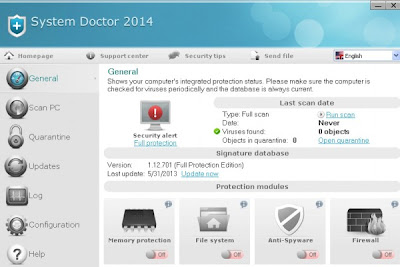
System Doctor 2014 is a fake antivirus program that invented by cyber criminals making money from user's account. This is a tricky virus that makes changes on system settings to pop up automatically and start to scan system files. The virus is intended to pop up lots of errors and infections to misleadingly convince users to wipe up all the threats completely. However, once users are trying to fix problems with the System Doctor 2014, you will be required to the sign up its full version product first. Just like what you may concern, the System Doctor 2014 is totally a phony program which is useless in protecting computer from any threat. To the contrast, it is risky to damage system files and drive computer vulnerable for other malware. Users who get infected with System Doctor 2014 should staying calm and never pay your money to the meaningless programs. It is just a waste of money! To get your computer back to the clean state, System Doctor 2014 must be removed completely without any delay.

Tuesday, April 23, 2013

How to Get Rid of Securebit Technologies Virus - Uninstall Securebit Technologies Completely


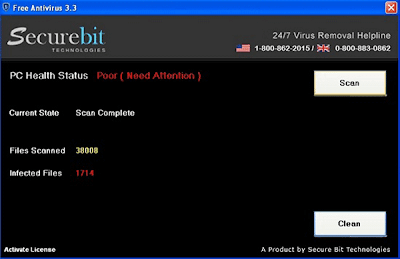
Securebit Technologies is not a worthy trusting antivirus program though it looks and performs in the way to legitimate ones. Actually, it is a fake antivirus scam that designed to make money from the victims who pay no suspect on it. Installing with Securebit Technologies, computer will be popped with dozens of falsified errors and infection warnings which are used to scare users to seriously worrying for computer's condition after an automatic system scan. It is worth mentioning that the lists of frightening waning messages popped up by Securebit Technologies are not real and existent. They are all imaginary threats that used to convince you to purchase for its products if to have the entire infections removed. Please be aware that Securebit Technologies is not a decent program that has the ability to help you in virus defense. All it can do is to make chaos on the targeted PCs and trick users with money. Needless to say, Securebit Technologies is a dangerous virus that can not be trusted. What you need to do to prevent computer from further damage that is to get rid of Securebit Technologies as soon as you can.

Tuesday, April 16, 2013

How to Uninstall Windows Essentials Pro 2013 Virus Efficiently


According to an authoritative analysis, Windows Essentials Pro 2013 is indeed a fake antivirus programs rather than the one helps users in virus defense. It is undeniable that this is quite elaborately designed fraudulent program that users can hardly distinguish Windows Essentials Pro 2013 from legitimate antivirus software. Additionally, it is always launched into workstation in the ways of Trojan horse assistance and other blamed means that the installation to this scam can be possibly happened when users clicking on any kind of suspicious links online. Following with the installation of Windows Essentials Pro 2013, computer will be taken over by this threat and endless security pop-ups with bunches of fake alerts and infections are about to display onto the screen for the wild ambition to make users pay for its license key and get all the listed viruses removed. Certainly, we can't do this as what Windows Essentials Pro 2013 requires. To the opposite, in an effort to safe guard your system files, it is strongly suggested to remove Windows Essentials Pro 2013 as early as possible.

Thursday, March 21, 2013

How to Remove Antivirus Security 2013 Virus - Get Rid of Antivirus Security 2013 Virus Effectively

Type: Rogue
Risky Level: High
Infected OS: Win7/XP/Vista/8

 Know More about Antivirus Security 2013 Virus


Antivirus Security 2013 Virus is undoubtedly a fake aitivirus program because of the failure in virus protection. It originates from the Rogue.WinWebSec and covers itself with legitimate appearance that users can hardly tell it apart from the reputable antivirus programs. The installation of this program can mainly attribute to Trojan horse via backdoor security hole. Additionally, spam email attachment, fake security web sites can be also utilized for the spread of Antivirus Security 2013 Virus. As long as the arrival into computer, the fraud hoax will secretly change system settings and initiate system scan automatically for the attempt to display users with multiple security warnings and infections which are all phony and nonexistent. They are totally fabricated to make money from the scary users if to have the infections removed and get back clean PC. In order to keep itself being stayed on computers, Antivirus Security 2013 Virus is able to block any programs that are supposed to risky to the removal of its components. Antivirus software will be never available to help you remove the virus since then. However, if you are annoying for the removal of Antivirus Security 2013 Virus, this manual removal guide may meet your help.

Saturday, March 16, 2013

How to Get Rid of XP Security Cleaner Pro - Easily Remove XP Security Cleaner Pro

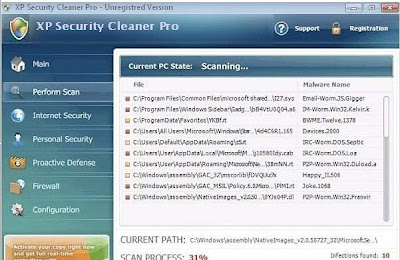
XP Security Cleaner Pro is highly tricky that is capable to alter its name into different ones according to different operating systems such as Win 7 Security Cleaner Pro, Vista Security Cleaner Pro. Once starting from the time it has been installed into your computer, there will be a pop up window showing on the desktop, which indicates that potential threat has been detected on computer and a fast scan will be required to take. Such kind of trick is always used by fake antivirus program to make users concern about their computers so that they have to initiate quick scan on system files in order to make sure for the security of the PCs. But behind the truth, there is a conspiracy that bunches of viruses created by the virus will be displayed onto the scan window to make the unsuspecting users fear for the situation and lose the mind to purchase its so-called full version product to have all those nonexistent infections wiped. Indeed, there is no need to overreacting while facing with such similar issues. Foremost, users need to check it up online and search for the relevant solutions to have it removed timely instead of paying money on it. Only in this way can your computer be protected safely. But if you are still annoying for finding an effective way to get rid of XP Security Cleaner Pro, the manual removal instructions on this article will meet with the help.